
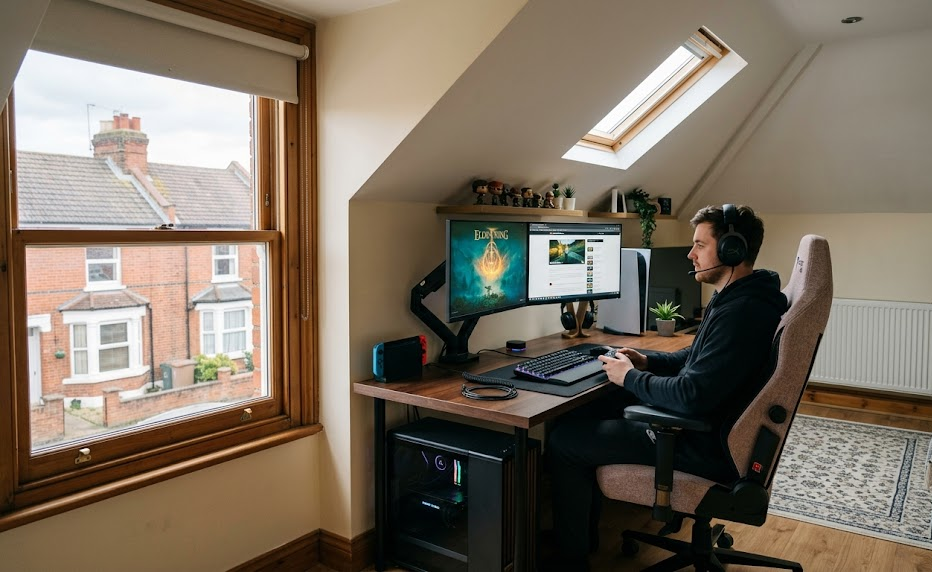
Gaming has expanded beyond the bedroom. What once fit on a small shelf now covers desks, walls, and floors. Racing rigs, triple monitors, streaming lights, and VR gear take up a lot of space.
The sound of fans and the glow of RGB lights are now common in many UK homes.
In fact, more than 40 million people regularly play video games in the UK alone, and the average gamer spends over 8 hours a week gaming. That kind of time needs a proper space.
Finding space for a setup can be difficult. You want to avoid crowding the living room or disturbing others in the house.
At The Geek Mates, we bridge the gap between high-performance technology and your modern lifestyle to help you build the ultimate setup.
Why Gaming Setups Keep Getting Bigger
Older game consoles needed a TV and couch. Today’s gaming setups take up more space. A standard professional setup includes:
- Core Hardware: Personal Computer (PC) and dual monitors.
- Content Creation Tools: Capture card, ring lights, and a microphone arm.
- Environmental Additions: Acoustic foam.
People who enjoy simulation racing add steering wheels, pedals, and special seats. VR players need a clear zone of about two metres to avoid hitting furniture.
According to IBIS World, the UK video games market will be valued at £8.2 billion soon, with 4,012 active businesses supporting it. This level of spending shows how seriously players take their equipment, which is why gamers now need dedicated environments for their gear.
Shared spaces struggle with these needs. Heat builds up quickly. Cables get tangled. Late-night gaming can disturb partners and roommates. Streamers have to deal with background noise from washing machines and barking dogs. Privacy is also a concern when your bedroom serves as a broadcasting studio.
Planning a Layout That Works
Start with the walls, not the floor. Using vertical storage creates more room on your desk and helps you avoid clutter. Install wall-mounted shelves for controllers, headsets, and collectibles. Pegboards are great for organising cables and accessories.
Good cable management is essential. Run cables through trunking, label each one, and use a single power block with surge protection. Choose an ergonomic gaming desk and a chair that support your lower back to keep you comfortable during long gaming sessions.
Tip: Organising different areas in the room is important. Use one space for your main computer, another for playing video games, and a corner for relaxing with a handheld device like the Steam Deck or Nintendo Switch.
Optimising Sound, Light, and Temperature
These three environmental factors are important for a professional experience:
- Sound Control for Cleaner Audio
Acoustic panels reduce echo and stop your microphone from picking up noises such as footsteps upstairs.
They also prevent gunfire and engine sounds from spreading throughout the house. You can get affordable foam tiles for under fifty pounds.
- Lighting That Looks and Feels Right
LED strips behind your monitors can help reduce eye strain during long sessions. These lights make a noticeable difference. Smart bulbs can sync with games, which gives you an immersive experience without blinding you during a match.
- Cooling and Connection Essentials
Heat can damage high-end PCs. To keep temperatures stable in summer, ensure you have the following:
- Good ventilation
- Small desk fan
- Portable AC
A stable internet connection is also crucial. Using a wired Ethernet connection is better than wifi for competitive play and streaming.
For a deeper breakdown of how connection type shapes gaming performance, explore this detailed guide on what to know about gaming on wired or wireless internet for more insights.
Why Gamers Are Moving Their Setups Outside the Main House
As gaming setups become larger and more specialised, some homeowners are moving beyond spare bedrooms wholly. Companies such as Surrey Hills Garden Buildings have seen growing interest in insulated garden rooms that double as a gaming room giving gamers and creators a dedicated space without taking over the rest of the house.
Streamers gain the most advantages. A separate building allows them to:
- Control sound
- Avoid interruptions from home during streams
- Provide a cleaner background for their content
The commute is just 10-20 steps across the lawn.
Popular Gaming Room Styles to Try
Choose the popular UK gaming style that fits your playstyle.
- Minimalist setups feature clean white desks, hidden cables, and one/two accent colours.
- Retro rooms include CRT TVs, arcade cabinets, and shelves filled with game cartridges
- Sim racing areas focus on rigs with wraparound screens.
- Streamer-focused rooms prioritise camera angles, display items on shelves, and utilise warm key lighting.
Look for ideas from creators on Twitch and YouTube who share their setup tours. You can also browse Pinterest boards filled with comfortable gaming aesthetics for plenty of inspiration without much effort.
Conclusion
A well-planned gaming room makes your hobby more fun. First, organise the layout. Next, control the sound and manage the heat. Finally, choose a style that matches your home.
Ready to upgrade your setup? Get in touch with us at The Geek Mates for gear guides, room inspiration, and trusted advice on building your dream space.
